MSHA compliance for every mine type

Every record MSHA asks for. One system.

Workplace exams, training files, Part 50 incidents, citations, chemicals, contractors, equipment. Captured on a phone in the pit — with no signal — and standing up on the dashboard before the truck is back at the office.

From $450 a month for your first site, $199 for each one after, with unlimited users. One month free when you pay annually. Onboarding is $750, once.

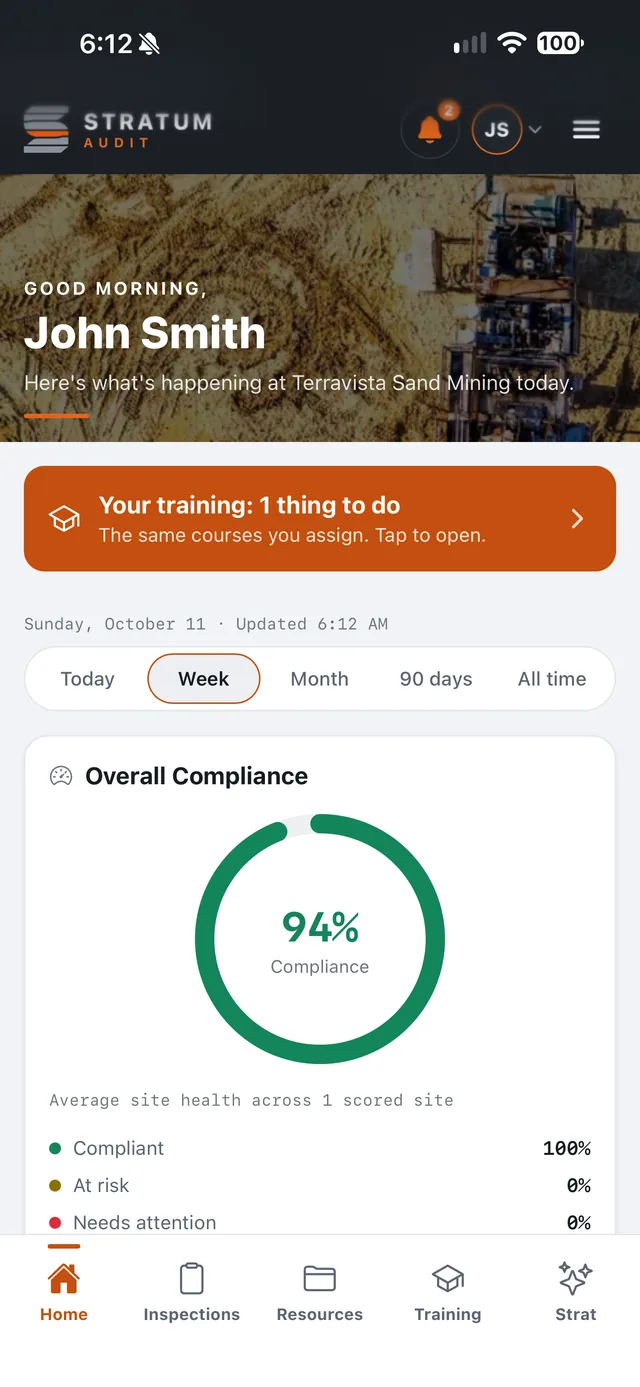
The Stratum Audit field app's home screen: one training item to do, this week's date range, and overall compliance at 94%.

In the box

Eighteen record types. One operation.

  • Workplace examinations
  • Custom forms
  • Corrective actions
  • Observations
  • Citations & orders
  • Part 50 incidents
  • Training & quizzes
  • Toolbox talks
  • Task training
  • Certifications
  • New miner onboarding
  • Contractors
  • Equipment & red tags
  • Chemicals & SDS
  • Environmental logs
  • Sites, zones & maps
  • Document library
  • Reporting & print

Why it matters

A binder can't tell you what's late.

It holds the records somebody remembered to file. It cannot count the exam nobody did, warn you before a refresher lapses, or find last spring's citation while an inspector waits. That is the part Stratum Audit does.

Workplace exams

On paper

Filled in at the face, carried back in a truck, and filed when somebody gets to it.

With Stratum Audit

Filled in on the phone at the face, signal or not, signed there, and on the dashboard once it is back in range.

Deadlines

On paper

A missed exam or a lapsed refresher turns up when somebody goes looking. Sometimes that somebody is the inspector.

With Stratum Audit

The dashboard counts what is overdue (exam schedules, abatement dates, Part 50 clocks, expiring credentials) before anyone asks.

The inspector's visit

On paper

Binders, inboxes and a few spreadsheets, gathered by hand while the inspector waits.

With Stratum Audit

Every record in one place, printable as a document an inspector can read, and exportable as PDF, CSV or JSON whenever you want.

The dashboard

The state of the operation, before you sit down.

Where the office works. Every section of the record has a page here, and the rail itself counts what has run past a deadline — so the question "is anything late anywhere" is answered before you click into anything.

Monday, 1 September  ·  updated 14:02

Overview

Inspections
128
124 of 128 submitted
Total findings
341
62 still open
Critical
6
2 past due
Sites covered
9
of 11 sites

Findings by severity

This week, across every site

Predictive maintenance

One CFR code recurring across 3+ findings on one asset  · 

Recent inspections

SiteTypeInspectorFindingsStatus

The rail counts what is late

Overdue exam schedules, citations past abatement, anything past a Part 50 deadline, expired credentials. Four numbers on the sidebar, each counting exactly what its page opens on.

Site health, against itself

The last thirty days measured against the thirty before them — open findings, overdue actions, completion rate — so a site drifting is visible while it is still drifting.

One reporting hub

Analytics, cross-site benchmarking and the print and export path share one filter bar and one document frame. Roll it up by site, by crew, or across the whole operation.

Roles the database enforces

Admin, manager, inspector, viewer, contractor. The screens gate on role and so does every query behind them — a tampered client still cannot read a row it was not given.

Setup is naming your organization and adding a site. The dashboard fills itself in from there, as the crew walks.

Create an account

The field app

The half of the job that happens out of range.

The same record, in a hand, at the face. It writes locally first and tells you plainly how much is still waiting to go up — because coverage on a mine site is where it is, not where you need it.

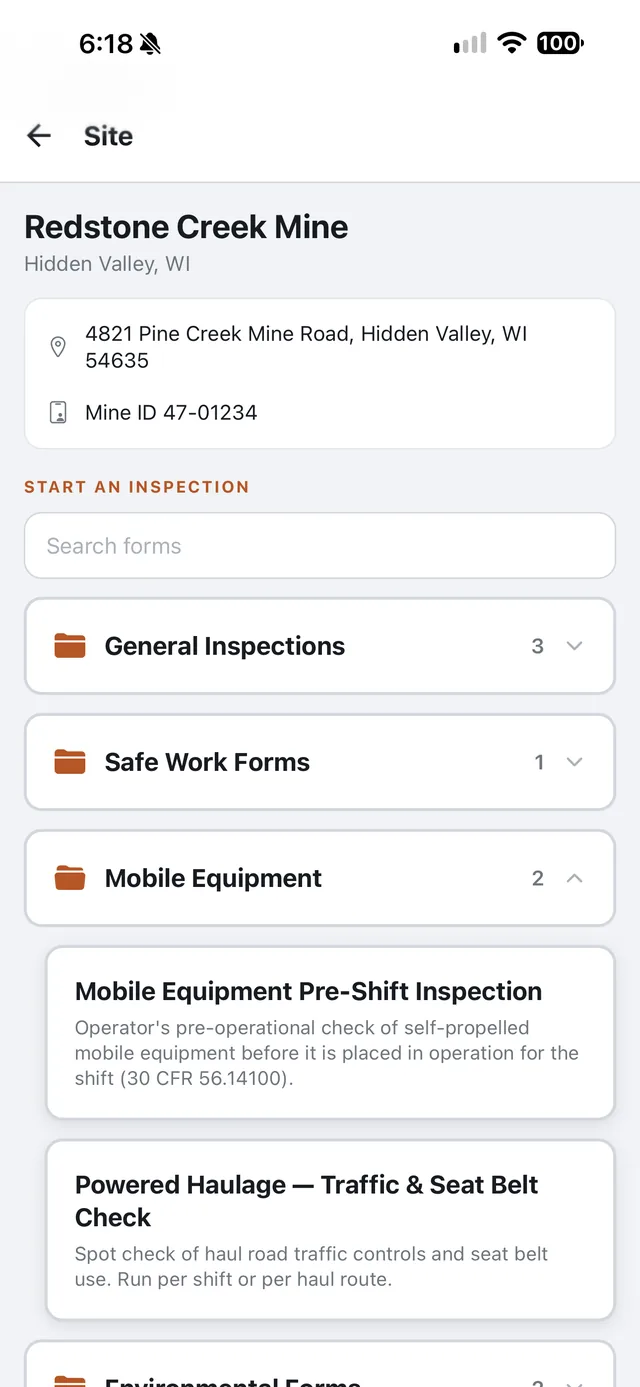
Starting an inspection at a site in the field app: the address and Mine ID, a search box, and the forms in folders such as General Inspections and Mobile Equipment.
  • Nothing waits on a bar of signal

    Photos, readings and signatures are written to the phone first. Close the app, drop it, drive out of the pit — the walk is still there, and the pending count is on screen until it reads zero.

  • Photos attach as you shoot them

    Each picture lands on the item it belongs to at the moment of capture, so nothing depends on remembering to file it at the end of a twelve-hour shift.

  • The home screen follows the seat

    A manager opens to site-wide numbers. Everyone else opens to what their crew owes today, their own shortcuts, and the training they still have outstanding.

  • Signed on the glass, where it happened

    Sign-to-complete, participant sign-in, toolbox talk attendance and the three-party training chain are all captured on the phone and travel with the record.

  • On the phone in about a minute

    No store, no review queue, no MDM ticket. Open one link on the handset and add it to the home screen — which is how a contractor gets going on their first morning. Walk through putting it on a phone.

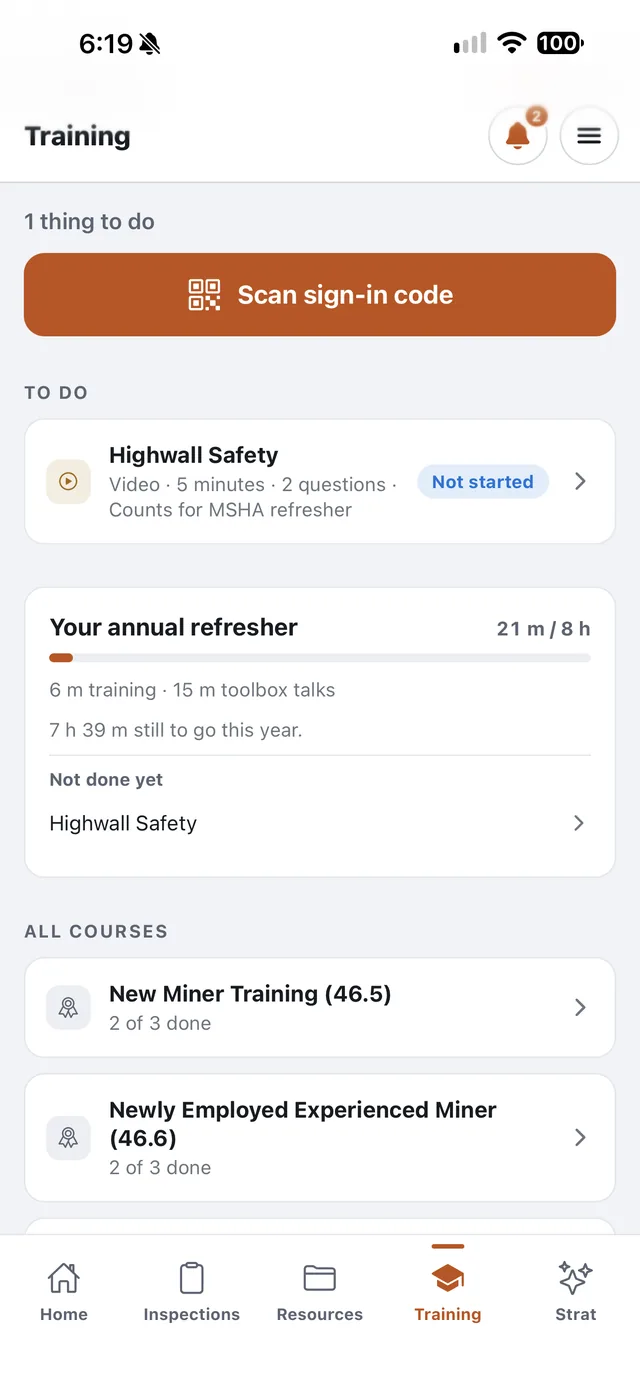
The Training tab: one course to do, a sign-in code scanner, and progress toward the MSHA annual refresher.
Training, and the annual refresher hours it counts toward.
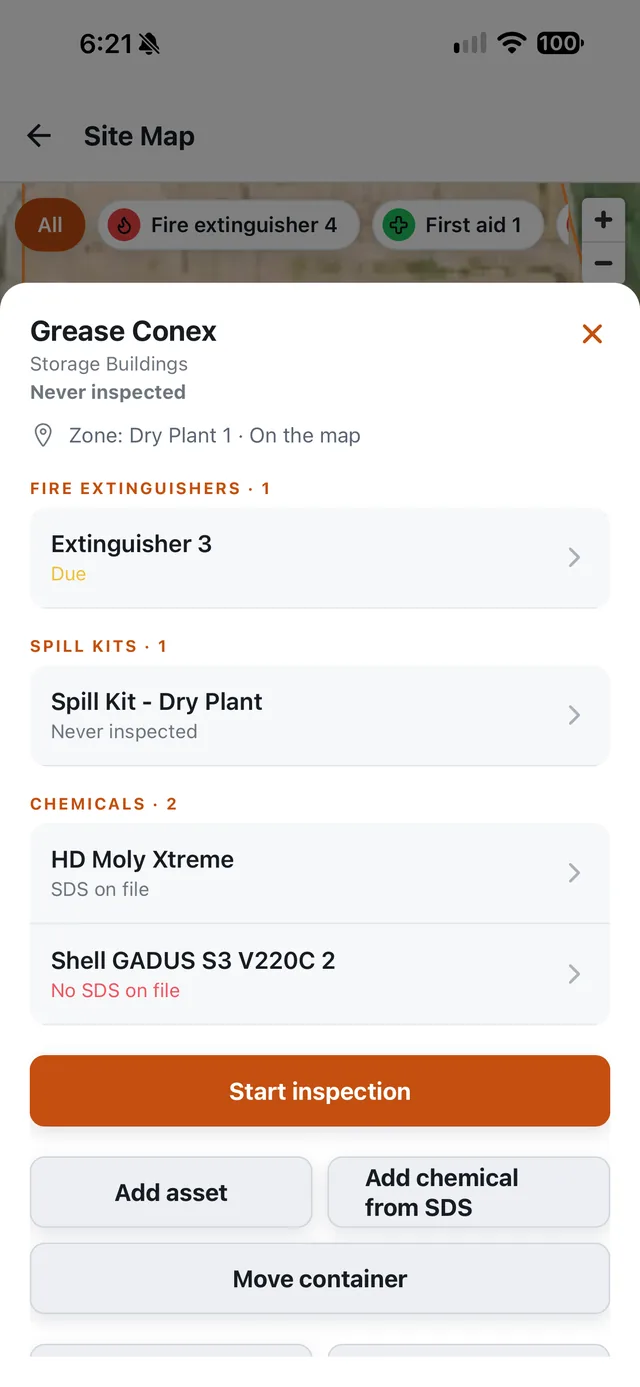
An asset's sheet opened from the site map: an extinguisher due, a spill kit never inspected, and a chemical with no SDS on file.
An asset's sheet, from the site map: what is due and what is missing.
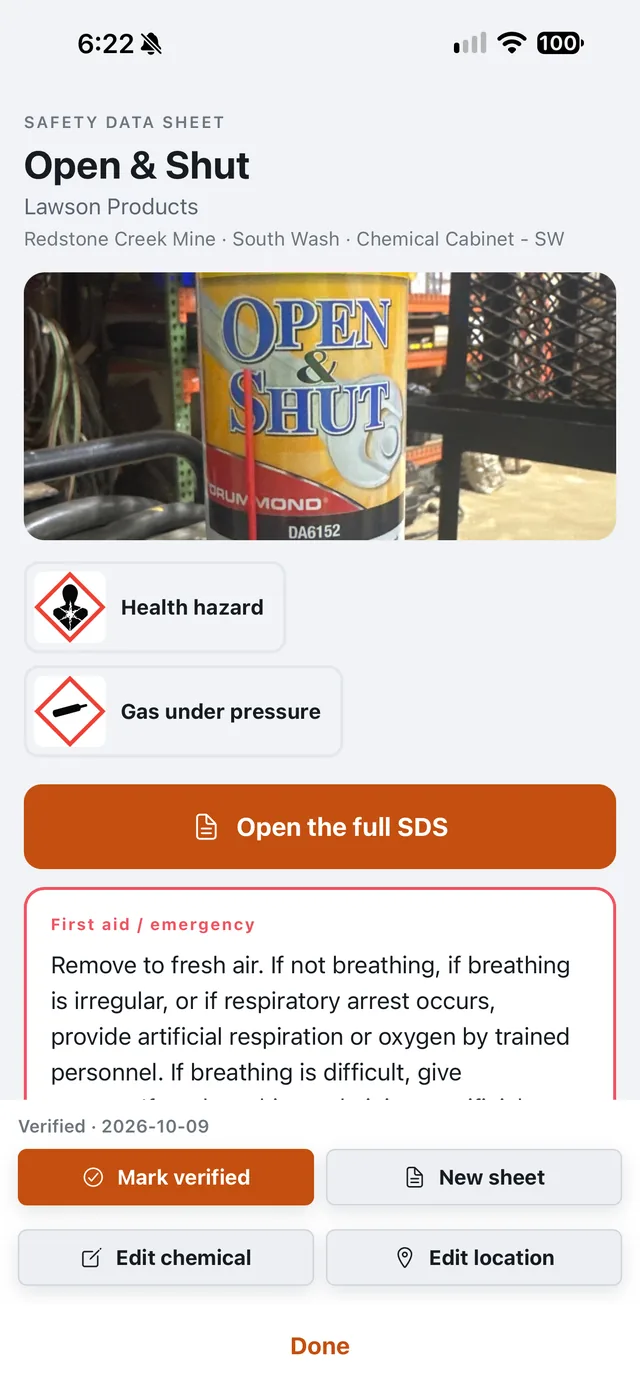
A safety data sheet on the phone: the container photo, its hazard pictograms, the full SDS and first-aid instructions.
The SDS for what is in the cabinet, with its pictograms and first aid.

No store, no review queue, no MDM ticket — and nothing lost when the signal goes.

Create an account

What sets it apart

The parts that usually get left to a spreadsheet.

Most compliance software stops at a checklist and a due date. These are the things underneath it — the ones that decide whether a record survives contact with an inspector.

01

The standard cited, and boxed on the photo

The examiner photographs the hazard, draws a numbered box on the frame where it is, and picks the 30 CFR paragraph from a searchable list that works with no signal. Every finding is written by the person who saw it, and your photographs never leave your own storage.

02

Part 50 that is the regulation, not a summary

The twelve §50.2(h) accidents, in the regulation's own words. Tick what happened and Stratum Audit tells you whether the 15-minute §50.10 call is owed — and runs the ten-working-day clock on the 7000-1 after it.

03

Method 9 that does the arithmetic

Opacity read into a grid, with the highest averaging-window mean — the number a determination actually turns on — computed as you go. It works out sun position and whether you are standing where the observer rule requires.

04

Task training that takes three signatures

Competent trainer signs, operator signs, safety manager approves. Nobody is signed off to run a machine until all three are on the record — and the phone and the dashboard can never disagree about which stage it is at.

05

Trainer designations that gate the picker

A competent trainer is designated per zone and per machine, separately — because competence in an area is not competence on every machine standing in it. Whoever picks a trainer only sees the ones qualified for that job.

06

Part 46 onboarding, already written

The 46.5 and 46.6 curricula ship as the regulation's own seven subjects, not a blank template for you to fill in. Finishing the track mints the credential and starts its expiry clock.

07

A red tag anyone can hang, only a manager clears

The inspector who finds the defect takes the machine out of service on the spot. Clearing it needs a manager and a repair note. The split is enforced in the database, not by hiding a button.

08

Repeat defects that surface themselves

When one CFR code turns up across three or more findings on the same asset, the dashboard flags it as a likely maintenance root cause. That is a purchase order, not another corrective action.

09

An SDS a contractor can read with no account

Print a QR label for the drum. Scanning it opens the current revision of the sheet — no login, and it still works for somebody signed in to their own company on a multi-employer site.

10

Zones on a map, and the asset that landed in one

Draw each area as a GPS circle. Drop an asset pin and it knows which zone it fell in — so a walk, a machine and a trainer's designation are all talking about the same piece of ground.

11

The site's weather, written into the form

Wind speed, temperature and the direction the plume is drifting fill themselves from conditions at the site at the moment of the reading. Nobody is reconstructing the wind from memory on Friday afternoon.

12

The whole app in Spanish

Not a translated login screen. Each person picks their language and the app is in it — while the record itself reads the same to whoever opens it next.

Two plans, priced per site with unlimited users. The whole suite is in each of them.

See the pricing

How they work together

One walk, from the pit to the print-out.

The phone and the dashboard are two ends of the same record, not two products that export to each other. Here is the whole path a finding takes.

01 · PHONE

Captured

The exam is walked. Each hazard is shot, boxed on the photo and cited from the 30 CFR list by the examiner, on the device first, signal or not.

02 · PHONE

Queued

It sits in a local queue with a count on screen. Nothing is lost if the app closes or the battery goes.

03 · SYNC

Uploaded

Back in range the batch goes up — the walk, then each photo, resumable and idempotent. Only a complete batch is released.

04 · DASHBOARD

Counted

It lands exactly as the examiner wrote it — the standard, the severity, the box on the photo — and the site's numbers and the rail count it from that moment.

05 · DASHBOARD

Assigned

It becomes a corrective action with an owner and a date. A warning 24 hours out, then overdue, then it escalates.

06 · RECORD

Closed

Evidence of the fix attached, signed and timestamped. It opens as a printable document for whoever asks.

Built for sites without signal.

The field app keeps working in the pit and syncs when you come back into range — and it tells you, plainly and constantly, how much work is still waiting to go up. A walk is not finished until that count reads zero.

Works offlineFull capture
InstallHome screen
DevicesiOS & Android
LanguagesEnglish & Español
Pending workAlways visible

Strat · Plus plan only

An assistant that works inside the record.

Included with Plus, not with Core. Strat reads your forms, the records your crews enter and the text of 30 CFR. It answers questions and drafts forms, task training and toolbox talks. It cannot create, change or sign a record: a person always does.

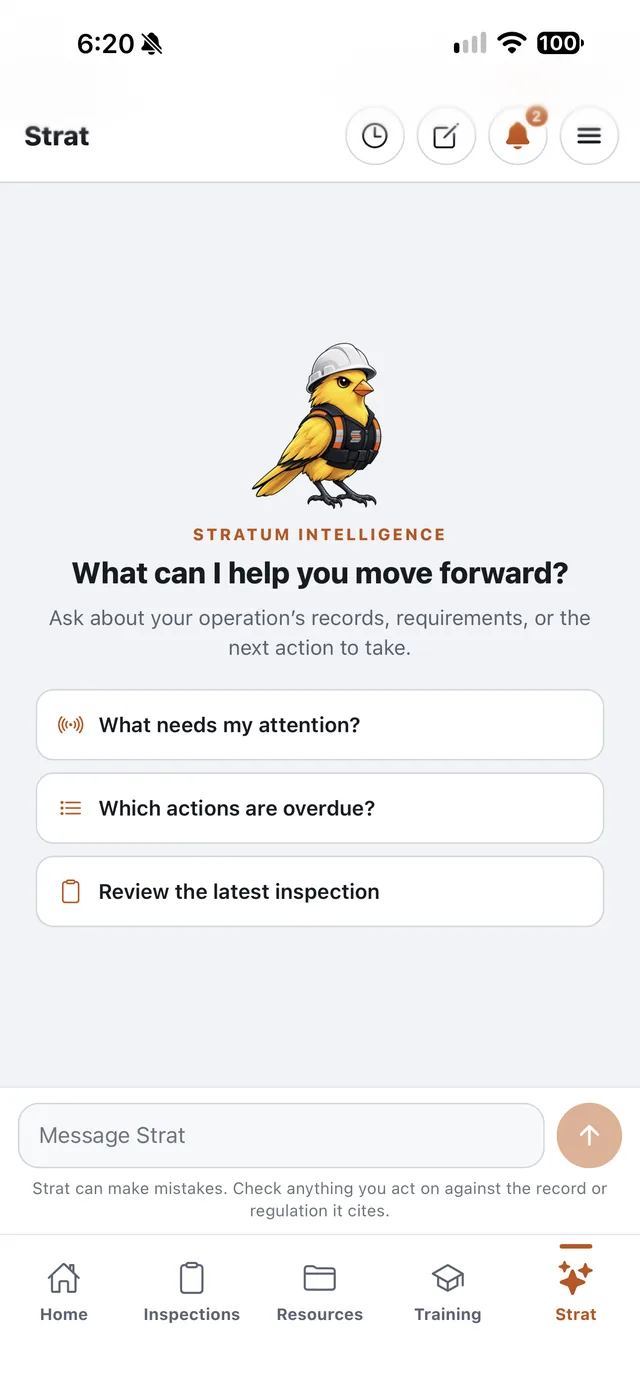
Strat on the phone: suggested questions such as 'What needs my attention?', and a note that Strat can make mistakes and anything acted on should be checked against the record or regulation it cites.
  • YOUR RECORDS

    Ask about this operation, not the internet

    What is overdue at the North Pit, who is missing a refresher, every guarding finding on Loader 4 since July. Strat reads with the permissions of the person asking, so it sees exactly what they could see — no more.

  • 30 CFR

    Every citation checked against the regulation

    Strat searches its copy of 30 CFR before it names a section, and a section number it did not look up is struck before anyone reads the answer. It can still be wrong, so every citation opens the regulation's own text: checking is one click.

  • FORMS

    A paper form in, a digital form out

    Photograph a paper checklist or upload the PDF, Word or Excel file, and Strat drafts it in Form Builder — tick boxes, dropdowns and all. No crew can run it until a manager reviews and publishes it.

  • TRAINING

    Task training for the machine you actually own

    Name a machine from your asset register and Strat drafts its task training from its make and model: pre-op check, procedure, lockout points, PPE, hazards, shutdown. Toolbox talks too, written to be read aloud to a crew.

  • EVERYWHERE

    On the dashboard and in the pocket

    Admins and managers have Strat in a panel on the dashboard and on the field app's bottom bar, with the same past conversations on both, so one started at the desk can be picked up at the pit.

  • PHOTOS

    Your inspection photos stay yours

    Strat cannot reach your photo storage. It sees a photo only when somebody adds one to a conversation on the dashboard, and it has no way to turn one into a finding: what a photo shows is a call for the person who was there.

Strat is the whole difference between the two plans. Everything else is in both.

Compare the plans

Pricing

Two plans, billed per site.

One subscription per organization. You pay for each site — one mine or operation with its own MSHA Mine ID — and the pit, plant and shop inside it are zones, which are unlimited. So are users: nobody is counted per seat.

Core

The whole compliance record, kept by your own people.

$4,950/ year, first site

Each additional site $2,189 / year

1 month free 12 months for the price of 11

Or $450 / month and $199 / month per additional site, billed monthly.

Get started
  • Digital forms & checklists — workplace exams, custom forms, toolbox talks and task training, signed on the phone and offline.
  • Training, Part 50 & citations — certifications and refreshers on their clocks, 7000-1 and 7000-2 reporting, and every citation tracked to abatement.
  • SDS & chemical tracking — the binder kept current, searchable, and printable at the site it belongs to.
  • Corrective action tracking — an owner, a due date, escalation when it slips, and evidence of the fix attached at close.
  • Analytics & reporting — findings by site, severity and trend, exported or printed as a document an inspector can read.
  • Asset management — equipment and red tags, sites and zones, contractors and their people on one register.
  • Admin dashboard and the offline field app, for unlimited users.
  • No Strat. The AI assistant is in Plus only.

Plus Includes Strat

The same record, with an assistant that works inside it.

$7,150/ year, first site

Each additional site $3,839 / year

1 month free 12 months for the price of 11

Or $650 / month and $349 / month per additional site, billed monthly.

Get started
  • Everything in Core, plus Strat, the AI assistant:
  • Answers from your own records — what is overdue, who is missing a refresher, every finding on one machine. It sees exactly what the person asking could see, and no more.
  • Cites only what it looked up — every 30 CFR section is checked against the regulation's text, and one it could not verify is struck before you read the answer.
  • Drafts, never decides — a paper form into a Form Builder form, task training for a named machine, a toolbox talk. It cannot create or change a record; a manager reviews and publishes every draft.
  • For admins and managers — on the dashboard and in the field app, with past conversations kept on both. What Strat does.

Onboarding

Once per organization, charged at signup. Not per site, not part of the subscription, and it does not recur when you add sites later.

$750 one-time

Estimate your bill

Pick a plan, how many sites you run and how you pay. Every line of the sum is shown.

Worked out for Core, three sites, paid annually.

First site
$4,950
Additional sites (2 × $2,189)
$4,378
Subscription, per year
$9,328
Onboarding, one-time
$750
Due today
$10,078

Then $9,328 a year, before tax. Paying annually saves $848 a year.

Pay by card or by invoice, net 30. Prices are before tax.

Running more than ten sites? Contact us for a custom plan.

Questions

What procurement will ask.

We run a pit and a plant under one Mine ID. Is that one site or two?

One. A site is one mine or operation with its own MSHA Mine ID. The pit, plant and shop inside it are zones, and zones are unlimited. So are users: nobody on either plan is counted per seat.

Does it work for coal and underground mines?

Yes. Stratum Audit is for every mine type MSHA inspects: surface and underground, metal/nonmetal and coal. Strat's regulation library holds the MSHA standards in 30 CFR, including Parts 56 and 57 for metal/nonmetal, Parts 70 to 77 and 90 for coal, and Parts 46 and 48 for training. The new-miner courses that come already written follow Part 46; Part 48 annual refreshers are tracked like any other credential, each on its own expiry clock.

What happens to the bill when we add a site, or delete one?

An administrator adds the site in the dashboard, and the subscription goes up by one site at your plan's additional-site price, prorated for the rest of the billing period. Delete one and you are billed for one fewer, with the unused time credited on the next invoice. Deleting a site cannot be undone, so export its records first.

What is the onboarding fee?

$750, once per organization, charged at signup. It is not per site, it is not part of the subscription, and adding sites later does not charge it again. If you would rather we came to your operation and walked your crew through it in the field, on-site setup is quoted by location. Get in touch.

Can we try it before we pay?

The dashboard demo near the top of this page is the real interface on sample data, and anyone can click through it. There is no trial period: the discount is paying annually, twelve months for the price of eleven.

Can we pay by invoice? Is tax included?

Pay by card, or by invoice on net-30 terms; Stripe emails the invoice to your billing contact. Prices are before tax, which is added where it applies. If a payment runs late, the service keeps going for a period, so an expired card or an invoice sitting in accounts payable does not stop your recordkeeping.

Can we change plans later?

Yes. An administrator changes plan under Manage billing in the dashboard. Your sites and records stay where they are; moving from Plus to Core switches Strat off.

If we cancel, what happens to our records?

Cancel from the billing portal in the dashboard, and it takes effect at the end of the period you have paid for. You can export your complete data set at any time from Reports, as PDF, CSV and JSON. After the subscription ends the data is kept for 90 days so you can export it, then deleted. Records 30 CFR requires you to keep remain yours to keep, so export them before that window closes. Terms, §10–11.

Does Plus send our inspection photos to an AI company?

No. Inspection photographs are never sent to Anthropic or to any other third party; they stay in your organization's private storage. Strat works from your organization's own compliance records, and the only files it sees are ones a person deliberately adds to a Strat conversation. Privacy policy, §5.

Security

Your records, kept like evidence.

These are the records you hand a federal inspector. They are kept apart from every other company's, they cannot be quietly edited, and they leave with you whenever you ask.

The short version for your IT department.

Each company's records are kept apart by the database itself, on every table, not by what a screen chooses to show. Captures, findings, assignments, closures and views go into an append-only log that nobody can edit, administrators included. Anything else your IT department wants to know: support@stratumaudit.com.

SeparationDatabase-enforced, every table
EncryptionTLS in transit · AES-256 at rest
PhotosPrivate storage · short-lived signed links
Inspection photos to AINever
Audit logAppend-only · SHA-256 hash chain
ExportPDF, CSV and full JSON, any time
Deletion requestConfirmed in writing within 30 days
After you cancel90 days to export, then deleted

Contact

Talk to a person.

For on-site setup, more than ten sites, or a question this page did not answer. Tell us how many sites you run and where they are.

support@stratumaudit.com

Email us

Put it in front of the next exam.

Create an account and you are the admin: name your organization, add your first site, and invite your crew with the role each of them gets.

Already have an account? Sign in to the dashboard.